Doma Auto-Sniper
A headless bot that watches the Doma launch schedule, sizes each buy by tier, fires the moment a launchpad goes live, then manages every position on a 5-rung take-profit ladder with hard exits for dead launches and a Day-6 stop. It's the best-performing of my three public bots — and the most opinionated.
What this is
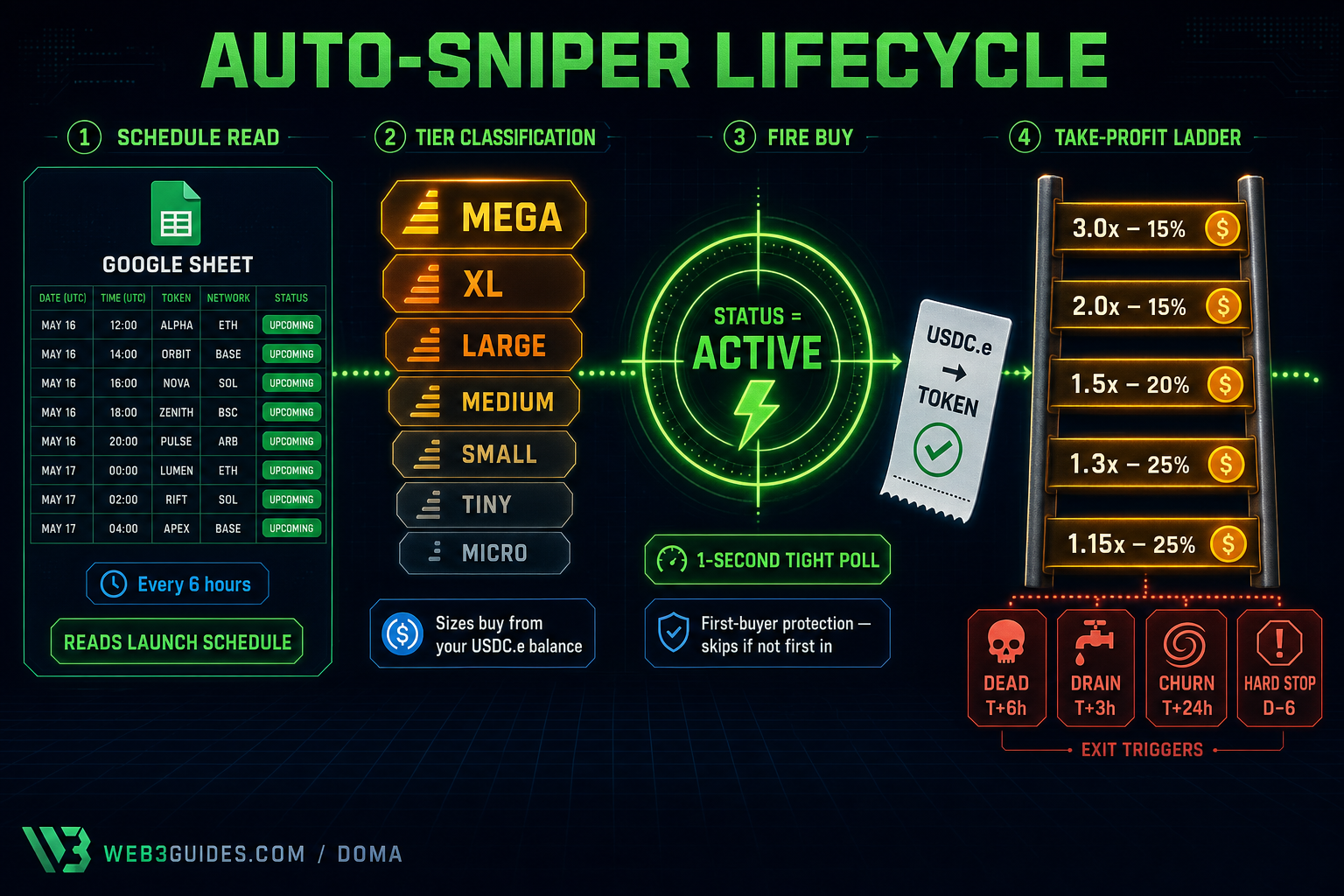
The auto-sniper reads the public Doma launch schedule from a Google Sheet every six hours, classifies upcoming launches into tiers (Micro → Mega), and pre-calculates the buy size from your wallet balance. In the last five minutes before a launch goes live it tight-polls the Doma API once per second; the moment status flips to active, it fires a buy — but only if it can confirm it's the first buyer (or close enough to it on larger tiers). Once a position is open, the bot manages it on a five-rung take-profit ladder (1.15× / 1.30× / 1.50× / 2× / 3×), exits dead launches that don't move, walks away from churning bonding curves, and hard-stops anything still on the curve by Day-6. Every state change is recorded to SQLite so you can audit and reconcile.
How it works
Tier-based sizing
Every launch on the schedule is classified Micro → Tiny → Small → Medium → Large → XL → Mega and the buy size is calculated from your USDC.e balance times the tier multiplier. Most launches are Small or Tiny so the slippage cap usually dominates and you get clipped to $5–$15 — by design.
5-rung take-profit ladder
Once a position opens, the bot sells 25% at 1.15×, then 25% at 1.30×, 20% at 1.50×, 15% at 2.0×, and the last 15% at 3.0×. The 1.15× rung exists because the data says that's where most launches actually top — you cap the rare 10× to harvest the common 1.15×. Real winners that graduate to a V3 pool are held and sold manually.
First-buyer protection + dead exits
Before firing, the bot reads the launchpad's USDC.e balance — if it's not first in on a Small tier, it skips entirely. After buying, it watches every position for stalled price action: dead at T+6h, slow-drain at T+3h, churn at T+24h, hard stop at Day-6. ~20–30% of snipes exit at a small loss; the winners pay for the losers.
Quickstart
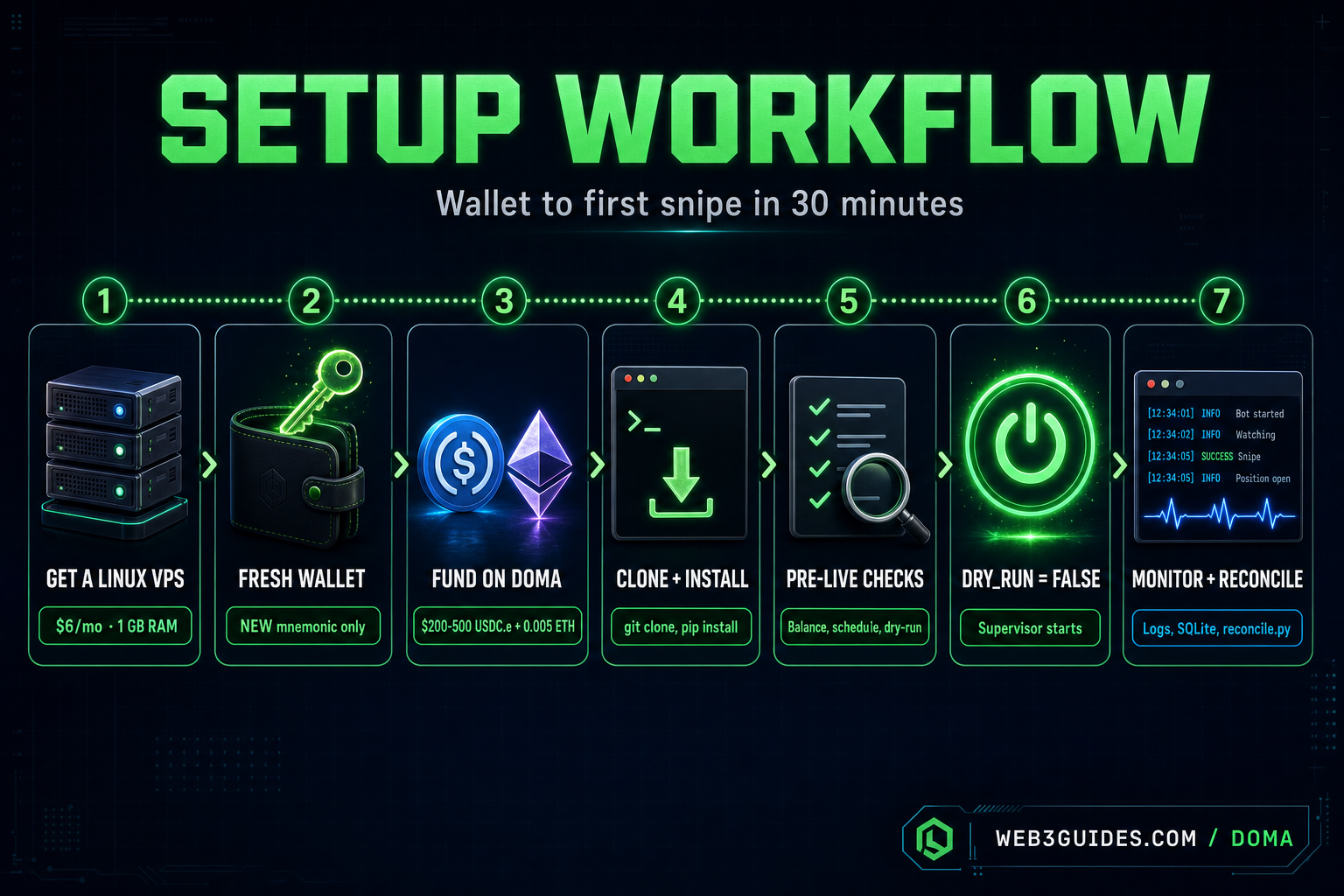
Full step-by-step guide ↗High-level shape so you know what you're in for. Each step in the full guide has the exact commands to copy-paste.
- 1
Get a $6 Linux VPS
Ubuntu 22.04 LTS or 24.04 on DigitalOcean, Hetzner, Vultr, or Linode. 1 vCPU / 1 GB RAM is plenty. SSH key auth only.
- 2
Generate a fresh, dedicated wallet
Never reuse your main wallet — the mnemonic lives in plaintext on the VPS. The guide includes a Python one-liner that mints a brand-new mnemonic + address in 5 seconds.
- 3
Fund $200–$500 USDC.e + 0.005 ETH on Doma
USDC.e at 0x31EE…c477, ETH for gas. The bot's address must match the wallet you generated. Bridge or send from another wallet you control.
- 4
Clone the repo and run the installer
git clone, create a venv, pip install, copy .env.example to .env and fill in the mnemonic + dashboard key. chmod 600 the .env. Takes 5–10 minutes total.
- 5
Run the pre-live verification checks
balance check, schedule fetch, tier classifier dry-run, DB init, supervisor config — every check has a one-line command and an expected output. If any output drifts, stop and investigate before going live.
- 6
Flip DRY_RUN=false and start supervisor
Three processes run under supervisor: scheduler, monitor, and (optionally) the FastAPI dashboard server. After it starts, tail the logs and wait for the first cycle — the bot will idle until the next scheduled launch.
- 7
Monitor + reconcile
Open positions, daily P&L, and exit reasons all log to SQLite + supervisor logs. Run reconcile_balance.py weekly. Sell any V3-graduated tokens manually on doma.xyz — auto-sell on graduation is disabled by design.
Honest risks — read these first
- 01Capital floor of $200, sweet spot $500–$2kBelow $200 the slippage cap clips every Small-tier buy to $8–$12 and gas overhead eats most of the upside. The bot is built for $500–$2k where 2–6 daily snipes have enough headroom to find a winner. Below the floor it's burning capital, not earning it.
- 0220–30% of snipes will exit deadThis is normal. The bot harvests the typical 1.05–1.20× post-launch pump on the majority of snipes and accepts small losses on the rest. A week with 5 dead exits and no winners is unpleasant but within expected variance — the 2× / 3× tail allocation drives most upside.
- 03V3 graduation is NOT auto-handledWhen a token graduates from the bonding curve to a V3 pool, the bot logs it and holds — the auto-sell flow is disabled because false-positive graduations from the Doma API have historically stranded tokens on the router. You sell those manually on doma.xyz.
- 04The 1.15× rung caps your moonshot upsideOn a real 10× runner you'll sell 25% of your position at 1.15× and miss the rest at the higher rungs. The data says this is positive EV across the full sample — but it will sting on the rare 10× you watch from the sidelines after the first sell.
- 05No emergency exit buttonOnce DRY_RUN=false, the bot just trades. bash stop.sh halts new buys and the sell loop, but it doesn't close any open positions — those sit in the DB at whatever state they're in. Plan capital allocation accordingly.
See it running on the public dashboard
I run this bot with real capital and publish every position, trade, and log line live. Click through to watch it tick.
Ready to try it?
Clone the repo, follow the guide, and start in dry-run mode. If you get stuck, the community is happy to help.